

Download ZapMessenger – Free, Secure Tool to Remove All Traces of MSN Messenger from Windows
ZapMessenger is a lightweight, no-frills utility designed to completely erase all remnants of MSN Messenger, Windows Live Messenger, and Windows Messenger 5.x from your Windows PC. If you're trying to reinstall an older or newer version of Messenger but keep getting errors like "Another version of the product is already installed" or "Your computer has a newer version of MSN Messenger than the one you are trying to install," ZapMessenger is the solution you need. This free software tool ensures a clean removal by targeting leftover registry entries, system files, and hidden folders that standard uninstallers often miss.
It’s especially useful for users upgrading systems, troubleshooting installation issues, or preparing PCs for clean software reinstallation. With just one click, ZapMessenger attempts a standard uninstall first, then falls back to a force removal if needed. While it doesn’t offer customization or advanced settings, its simplicity makes it reliable and effective.
It’s a must-have tool for anyone dealing with stubborn Messenger remnants on their system.
Key Features of ZapMessenger
Despite its minimalistic design, ZapMessenger delivers powerful functionality tailored to a single purpose: complete Messenger removal. One of its standout features is its ability to detect and remove multiple versions of MSN Messenger, including legacy versions like Windows Messenger 5.x, as well as newer iterations such as Windows Live Messenger. This broad compatibility ensures that users with older systems or those experimenting with different Messenger versions can benefit from a clean slate. The tool performs a two-step removal process: first, it tries a standard uninstall through Windows’ built-in Programs and Features. If that fails—common with corrupted or partially uninstalled software—it switches to a force-removal mode, directly targeting registry keys, configuration files, and installation folders that typically remain after uninstallation.
Another critical feature is its lightweight footprint. ZapMessenger doesn’t require installation, runs in seconds, and consumes minimal system resources. There’s no need to restart your PC after using it, making it ideal for quick troubleshooting.
It also preserves your personal data, such as contact lists and saved messages, because it only removes the software—not your account or messages. This is important for users who want to keep their data but simply need to reinstall the app. Additionally, ZapMessenger is free to download and use, with no ads, no bundled software, and no tracking—making it a secure choice for privacy-conscious users.
While it doesn’t support Mac or mobile platforms, its focus on Windows ensures deep integration and reliability on the target OS.
For users who rely on third-party Messenger add-ons like MessengerPlus!, it’s worth noting that ZapMessenger may not fully work in such environments. These plugins often modify how Messenger runs, which can interfere with the removal process. However, for standard installations, the tool is highly effective. It’s also a valuable asset for IT professionals and system administrators managing multiple PCs, offering a fast, consistent way to clean up Messenger remnants during system audits or upgrades. Overall, ZapMessenger is a niche but essential tool for anyone dealing with persistent Messenger installation issues on Windows.
How to Install and Use ZapMessenger
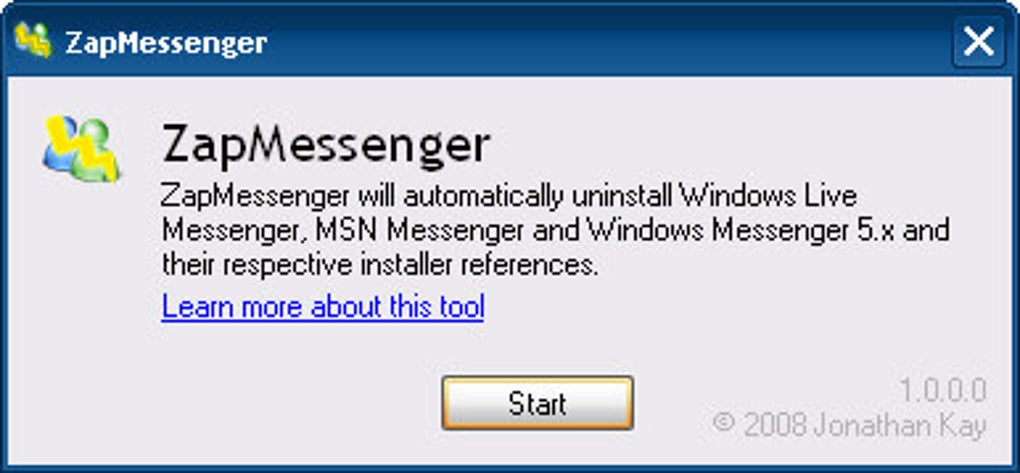
Using ZapMessenger is straightforward and requires no technical expertise. To get started, download the tool from a trusted source. Once downloaded, simply double-click the executable file to launch the application.
There’s no installer needed—ZapMessenger runs directly from the downloaded file, making it portable and easy to use across different machines. Upon opening, the tool immediately begins its removal process. It first attempts a standard uninstall through Windows’ control panel.
If the system detects an existing Messenger installation, it will proceed with the normal removal steps.
If the standard uninstall fails—often due to corrupted entries or incomplete previous installations—ZapMessenger automatically switches to its force-removal mode. This advanced function digs deep into the Windows registry, removes leftover keys under HKEY_LOCAL_MACHINE\SOFTWARE\Microsoft\Windows\CurrentVersion\Uninstall, and deletes hidden folders such as C:\Program Files\Windows Live\Messenger and %AppData%\Microsoft\Windows Live\Messenger. It also clears temporary files and cache associated with the app. Throughout the process, users receive a simple success or failure message at the end, with no intermediate updates. While this lack of detailed feedback may seem limiting, it ensures the tool remains fast and unobtrusive.
After the process completes, restart your computer to ensure all changes take effect. You can now attempt to reinstall MSN Messenger or Windows Live Messenger without encountering version conflicts. For best results, it’s recommended to run ZapMessenger as an administrator to ensure full system access.
It’s also wise to close all Messenger-related processes before running the tool. ZapMessenger doesn’t create backups, so if you’re unsure about removing Messenger, consider exporting your contact list beforehand. Overall, the entire process takes less than a minute and requires no configuration—perfect for users seeking a hassle-free solution.
Compatibility and System Requirements
ZapMessenger is specifically designed for Windows operating systems and supports a wide range of versions, including Windows 7, Windows 8, Windows 8.1, and Windows 10. It is not compatible with macOS, Linux, Android, or iOS, as it relies on Windows-specific registry and file system structures to perform its cleanup tasks. The tool has no complex system requirements—it runs on any PC with a minimum of 1 GB RAM and 100 MB of free disk space. Its portable nature means it doesn’t need to be installed, making it ideal for use on shared or restricted machines.
One of the key strengths of ZapMessenger is its backward compatibility. It effectively removes remnants from older versions like MSN Messenger 7.0 and Windows Messenger 5.5, as well as newer iterations such as Windows Live Messenger 2011 and 2012. This makes it useful not only for users upgrading their software but also for those restoring older systems or troubleshooting legacy applications. However, due to Microsoft’s official discontinuation of Windows Live Messenger in favor of Skype, the tool is now primarily relevant for historical or archival purposes. Still, it remains a valuable utility for retro computing enthusiasts, system cleanup tasks, or IT professionals managing outdated systems.
For users on modern Windows 11 systems, ZapMessenger may still work, though compatibility is not officially guaranteed. It’s always advisable to test the tool on a non-critical machine first. Additionally, since the software is no longer actively developed, users should ensure they download it from reputable sources to avoid malware or tampered versions. Always scan the downloaded file with antivirus software before execution. Despite its age, ZapMessenger continues to be a trusted tool in the Windows community for resolving stubborn Messenger installation conflicts.
Pros and Cons of ZapMessenger
- Pros:
- Completely removes all traces of MSN Messenger, including hidden files and registry entries.
- Free to download and use with no ads or bundled software.
- Lightweight and portable—no installation required.
- Supports multiple versions of Messenger, including legacy and newer releases.
- Fast and simple—one-click removal process.
- Safe for personal data; does not delete contacts or messages.
- Cons:
- Only works on Windows systems; no Mac or mobile support.
- No detailed progress feedback during removal.
- Not updated since Microsoft discontinued Messenger—may lack compatibility with newer Windows versions.
- May not work with third-party add-ons like MessengerPlus!.
- Does not offer backup or undo options—removal is permanent.
Frequently Asked Questions (FAQ)
Final Verdict: A Niche but Reliable Tool
ZapMessenger may be an older tool, but its purpose remains relevant for users dealing with legacy software issues. While Microsoft has officially replaced Windows Live Messenger with Skype, many users still encounter problems when trying to reinstall or troubleshoot older versions. ZapMessenger fills that gap with a simple, secure, and effective solution. Its ability to remove stubborn software traces—something standard uninstallers often miss—makes it a valuable addition to any system cleanup toolkit.
Despite its lack of updates and minimal interface, the tool’s reliability and zero cost make it a standout choice for Windows users. If you're facing installation errors due to leftover Messenger files, don’t hesitate to download ZapMessenger today. It’s a quick, safe, and free way to resolve version conflicts and prepare your system for a fresh Messenger installation.
Download ZapMessenger now and say goodbye to Messenger installation errors forever.







